


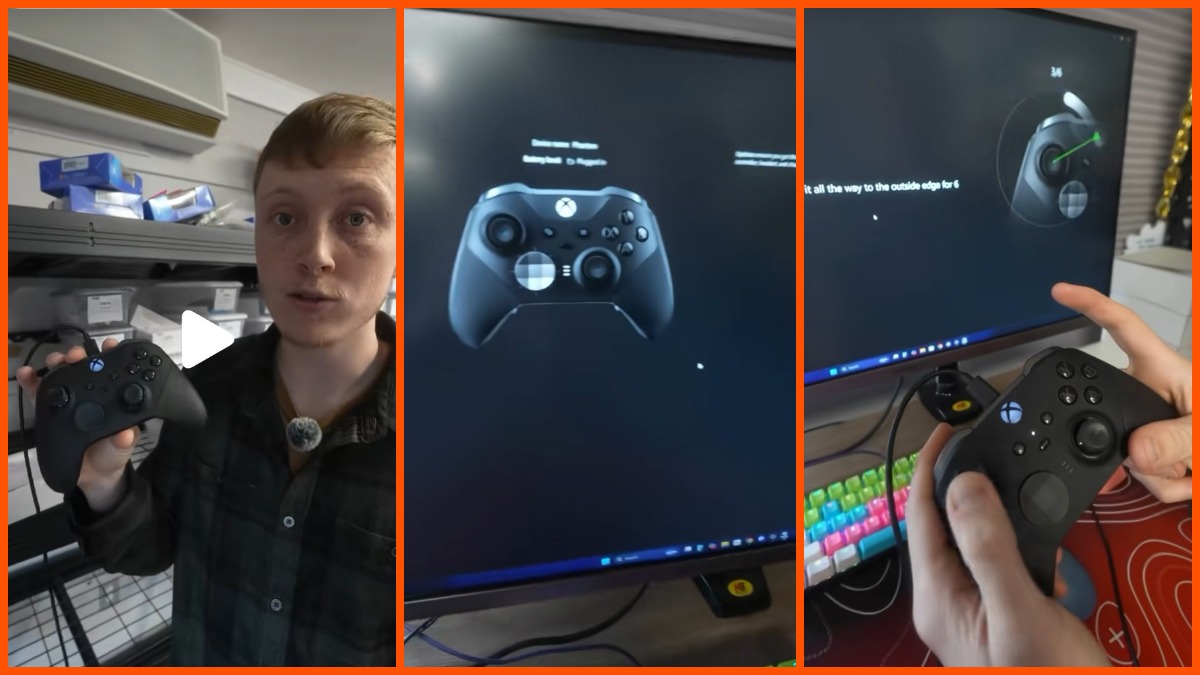

Ever dealt with your gaming character walking off a cliff by itself? Then you know how frustrating stick drift can be. Especially when you are mid-match. Chinch Gaming recently shared a potential fix on TikTok. He suggested that you might not need to pay for a replacement controller or professional repair. The TikToker claimed that the method can fix stick drift in under 20 seconds.
In the video, Chinch Gaming walked his viewers through the process. “Fix your Xbox Elite Stick drift without spending any money by using the Xbox Accessories app,” he announced. He plugged his controller into his computer and then zoomed in on his computer screen to show the process. He pointed out that he picked “Recalibration” and then picked which joystick he wanted to work on, “left.”
Then he instructed his viewers to follow the on-screen prompts. His recalibration began with rotations that help the app diagnose the problem. “So this is the part,” he said, pointing out the result, which highlighted the orientation of the joystick. “See how it’s a little bit of stick drift right there? This is the centering part. Up, right, down. Boom. Look at that stick drift. Fixed. Dead center. So if you have a little bit of stick drift, you might be able to fix it right at home. So”
His audience had issues
While his fix sounded like a dream come true, the reception online has been mixed. Some users in the comments section pointed out that this method doesn’t always yield the results Chinch Gaming promises. One user mentioned, “I tried to do that but it didn’t work,” while another noted, “it does nothing.” Others shared more concerning experiences, with one person warning against the process entirely.
They wrote, “Believe it or not I got two new controllers and for some reason I recalibrated them including my strick drifted controller and they all ended up moving crazily after the recalibration after using this part of settings. It’s like it destroys the software of the controller. Idk if it’s only my console that does this but I would never do the recalibration if I were you guys especially with an elite 2.”
To understand the problems with recalibration, it helps to understand what can happen to the joystick on your controller. According to Scuf Gaming, your controller can end up with stick drift and stick jitter. Drift occurs when the joystick fails to return perfectly to its center position, either physically or digitally. This is where you get automatic movement.
Scuf Gaming explains that this usually happens because the physical components that pull the stick back to center weaken over time. They noted that sensors can also misread electrical input due to things like temperature changes or electrical noise. Additionally, it can be something as basic as dust or grime buildup that introduces blockage.
Jitter, on the other hand, causes your aim to jump or shake during play. Scuf Gaming notes that this is often caused by the wear and tear of traditional analog sticks. That technology uses a carbon pad and wiper system. Over time, that carbon surface wears down, creating dust that interferes with signals or causes dropouts. The problem is physical and will likely get worse as the hardware degrades.
Unfortunately, as Scuf Gaming points out, this kind of wear isn’t really fixable through software calibration. However, console developers keep working on the tech. It was even a priority for Valve when they released the Steam Deck. Perhaps a good way to see how important it can be, an Xbox controller was used to pilot the Titan Submersible. Although it should be noted that that is not connected to the submersible’s ultimate fate.
Per Scuf Gaming, you can mask stick drift and stick jitter by increasing your deadzone. These are essentially small buffer zones around the center point that the game ignores. Competitive players often shrink these zones to get faster response times. However, it makes any small amount of drift much more noticeable.
Modern controllers reportedly come with newer tech like Hall Effect and TMR sensors. This uses magnetic fields instead of physical contact to read stick position. By removing the friction associated with traditional carbon pads, these sensors aim to eliminate the wear that leads to jitter. Scuf Gaming, however, clarifies that magnetic sensors don’t inherently fix mechanical centering issues.
If the physical mechanism that centers the stick gets worn out or misaligned, even a fancy magnetic sensor will still register that offset. Thus, a simple software recalibration like the one shown by Chinch Gaming will only work for your specific controller if your issue is a minor digital calibration error. A mechanical, hardware failure will require a different solution.





Published: Jul 14, 2026 12:38 am